Charlotte's Web ThingLink

Showing posts with label resources. Show all posts

Friday, April 28, 2017

Digital Citizenship Parent Morning Coffee with Merve from Common Sense

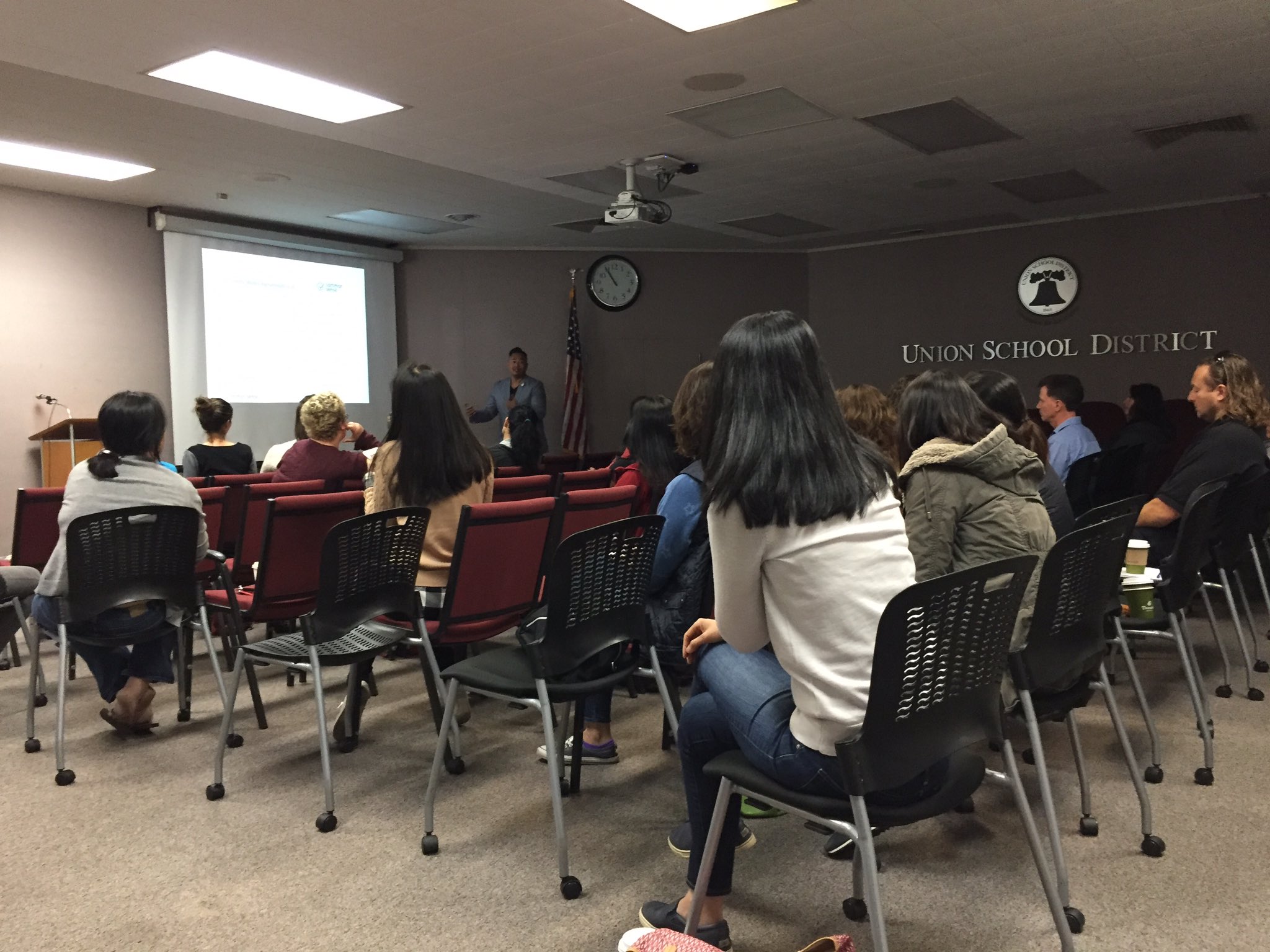
On Tuesday, April 25, Merve Lapus, Director of School Partnerships for Common Sense Education, came to the Union School District board room to talk with parents about current media trends in the lives of our kids.

He shared eye opening videos and statistics from a 2015 Common Sense Census of more than 2,600 8-18 year olds regarding tween and teen media use and a 2016 Common Sense Census of about 1,800 parents titled Plugged in Parents of Teens and Tweens. This helped open up a discussion about strategies for tackling the surrounding issues. Parents asked lots of questions and shared their own personal experiences and tactics for dealing with technology and media use in their homes. Merve stressed that it is always a good idea for parents to have open conversations with their children before jumping to conclusions and simply taking devices away. I was drawn to a quote that he shared from a 2014 Common Sense Focus group, "Adults don't get it. They think I'm addicted to technology - but I'm not. I'm addicted to my friends." Todays kids deal with the same basic issues that we dealt with when we were young, just in a very different way. With the power of social media, teens can now show their popularity by the number of likes that they have on their Instagram or Twitter feeds. Instead of having 100 friends, they can have thousands of followers.
Media Use by Tweens and Teens Full Infographic

Merve also shared Common Sense Education resources and gave tips to help parents connect with children on important issues regarding technology and media use. Common Sense understands that it may be difficult for adults to keep up with their children these days. He shared that parents can find descriptions and read parent tips for apps, tv shows, movies, websites and video games on their Reviews page. This is particularly helpful in helping parents decide weather or not to allow their child to watch something or play a game that may be popular among peer groups. Parents can also find a whole section titled Parent Concerns where they can find answers to frequently asked questions.

Connecting Families
Before closing out the presentation, Merve talked about a whole community approach to digital citizenship. He emphasized that it is OUR responsibility to reinforce that kids think critically, participate responsibly, and behave safely when engaging with media and technology on a daily basis. As teachers, we have to do our part to educate our students in the classroom, but it is equally important that parents do their part at home and in the community. He even shared with them Common Sense's Connecting Families page and how easy it is to hold parent group discussions using their Series of Conversation Cases that includes event fliers and discussion guides with questions about carefully selected videos that open up great conversations about tough topics like Cyberbullying, Video Games & Violent Content and Sexual Imagery & the Internet.  

The two hour presentation flew by and at the end of the event, parents were lining up to speak with Merve and thank him for his knowledge, expertise and advice. One parent came up to me and said, "We need to hold more events like this. All parents should come and see this." After sharing my sketchnotes about the event on Twitter, Merve tweeted, “great turnout today, & parents from room to parking lot praised the event.” 

Here's a link to his presentation slides: bit.ly/CSdigcit. Don't forget to check out all Common Sense parent and educator resources at commonsense.org.

Thursday, April 28, 2016

Math Review Gamified!


Math Review Game Board

Need a fun way to have students review topics that they've learned throughout the year? This week I've been working with Union Middle School math teachers Alyssa Starr and Joy D'Apuzzo on creating a 6th grade HyperDoc game board that gives students a fun way to review major math concepts. It's basically a Google Doc with tables of math activities. Feel free to explore, copy, and modify the Math 6 Review Game Board that we came up with.

This HyperDoc gives students choices about which activities they would like to complete and it also gives time back to the teacher, allowing for individualized or small group instruction.

When looking for activities to include in the game board, we were looking for a variety and a mixture of tech and non-tech related activities. Here's where I found some really great math resources:

I have to admit that it does take a lot of time searching for quality resources and games, but my advice is to collaborate with other teachers and TOSAs in your school district. The big payoff is student excitement about content related activities. The students don't have to sit and listen to another lecture from their teacher and the teacher is freed up to work with students who may need some extra support. 

Math Game Board in Action

Math Game Board in Action Tweet
Yesterday I had the opportunity to watch Miss Starr's class explore and complete game board activities. I did not see one student who was off task during the whole class period. Students were allowed to work in pairs and they had the freedom to choose where they wanted to sit in the classroom. Of course, some went straight to playing online math games like Inequality Wars or Percent Jeopardy, but others went directly to non-tech tasks. I watched 2 boys grab a deck of cards and play Exponent War with their notebook and whiteboards out and 2 girls in the back were working on writing a song about fractions.

Even though students were working next to their friends and collaborating on certain activities, not once did I feel like it got really noisy in the classroom. During a time when students are getting ready for SBAC testing, it's so nice to see smiles on students' faces and laughter and excitement throughout the room.

Modified Game Board and Activities for Elementary Math

Here's a game board that was created for 3rd Grade Math Review and 4th Grade Math Review. Thank you to Elise Plutt and Kristen Yoshioka for all of your 3rd and 4th grade advice and input when creating this HyperDoc. 

Please note: 
*If you do choose to make a copy of any of these game boards, please make changes and modifications to the activities according to YOUR students' skills. If your students have limited experience on Chromebooks, you might think about swapping some activities for hands on or paper-based tasks. 
If you have any questions, or would like any help or advice on creating a game board HyperDoc of your own, please feel free to contact me: pacadag@unionsd.org


Friday, February 5, 2016

Blogging in the Classroom Hangout On Air

Watch USD Learns: Blogging in the Classroom
Yesterday we had our very first Google Hangout on Air with a live Q&A about blogging in the classroom. There were a couple of hiccups along the way, but I left my office feeling very invigorated and proud to be working in a school district where teachers are willing to try new things beyond the walls of their own classrooms. This Hangout was a great example of that! I would like to send a huge thank you to Chanmi Chun, Kaitlin Klein, Todd Sinclair, and Jen Zangwill for spending the hour with me to talk about technology and pedagogy, in hopes that our stories can inspire others to try something new.

If you didn't get a chance to watch our conversation, the beauty of a Google Hangout on Air is that it gets automatically recorded and posted to YouTube. I invite you to watch USD Learns: Blogging in the Classroom. It is 53 minutes long, so just in case you're in a pinch for time, I did create a table of contents to help get you to the specific topics that we covered. 

If blogging is something that you are thinking about starting with your students, remember that you're not alone. The TOSAs are here to support you and we have amazing teachers, like Chanmi, Jen, Kaitlin, and Todd that are willing to take the time to share their experiences so that we can all learn from them. 

For more resources about blogging, including ones that we talked about in our Hangout, check out the Blogging Resources Page:

6th grade students in Mrs. Chun's Class learn about commenting from 2nd grade student experts.